Edit formulas after OCR
Use OCR output as a starting point, then correct symbols and structure before finalizing your document.
editable Word equations
Do not leave formulas trapped as screenshots. Use math OCR to recognize equation structure, review the result, and export Word-ready equations where supported.
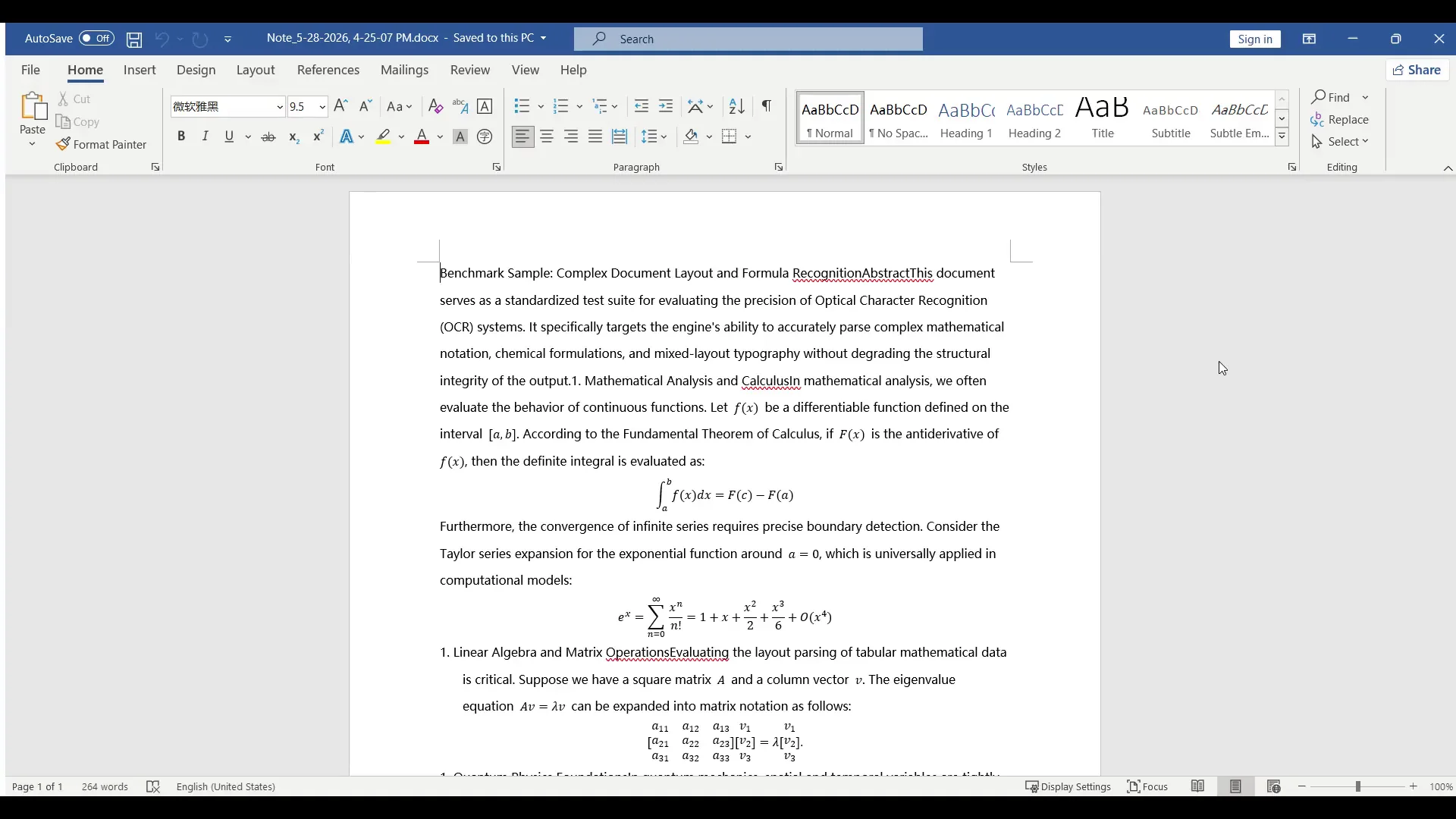
Editable equation export
A screenshot may look fine, but it is hard to edit, search, copy, format, or reuse. Editable Word equations give you a better starting point for assignments, teaching material, research notes, and technical documentation.
Use OCR output as a starting point, then correct symbols and structure before finalizing your document.
Copy, format, search, and update equations instead of recreating them from scratch.
Create Word, PDF, LaTeX, text, or project files depending on how you plan to use the result.
Native output
This page focuses on what it means for a formula to be editable in Word. When a formula is supported, math OCR can create Word-ready equation output. For complex notation, dense handwriting, or unsupported layouts, you may still need a fallback image, LaTeX cleanup, or PDF export.
Best when you need to correct symbols, change formatting, reuse equations, or continue editing in Word.
Useful when visual layout matters but the equation is too complex to convert cleanly without manual correction.
Use LaTeX for reusable math markup and PDF when final page appearance matters more than editing.
Why editable equations matter
Image formulas are static. They cannot be corrected easily, often blur when resized, and are not convenient for later editing. A math OCR workflow helps turn the scan into structured output so you can fix mistakes and keep working in Word.
Clean up homework notes, formula sheets, and study material without retyping every equation.
Update old worksheets and printed handouts so they can be reused in new lessons.
Extract and correct formulas from technical material for reports, notes, and drafts.
Workflow
Upload a formula image, worksheet photo, screenshot, or scanned page.
Run math OCR to identify text, symbols, and equation structure.
Check fractions, matrices, brackets, superscripts, and subscripts.
Create a document you can continue editing in Word.
Accuracy notes
Editable does not mean error-free. OCR may misread small symbols, unclear handwriting, dense matrices, or low-quality scans. The best workflow is to recognize the formula, review it, correct the mistakes, and then export.
OCR paths
FAQ
Editable equations can be corrected, copied, searched, formatted, and reused. Image formulas are harder to update.
Yes. Teachers can convert worksheet scans and printed formulas into reusable Word or PDF material.
Yes. Use Word when editing matters and PDF when layout and sharing are the priority.
Supported formulas can be exported as editable output, but complex notation and messy scans may need manual correction.
Related OCR workflows
math OCR to Word
Convert scanned math notes, worksheets, and formula images into editable Word documents. Review OCR blocks, correct equations, and export Word, PDF, LaTeX, or text.
image to Word equation
Convert equation screenshots and formula photos into Word-ready output. Review symbols, fix OCR mistakes, and export editable equations instead of flat images.
PDF to Word with equations
Convert scanned math PDFs into Word documents with editable equations. Review page blocks, correct formulas, and export reusable Word, PDF, LaTeX, or text.
OCR math formula
Recognize math formulas from images, screenshots, worksheets, and scanned pages. Extract fractions, matrices, integrals, symbols, and export Word or LaTeX.
Offline OCR: Math to Word