Start from a real scan
Upload a worksheet photo, screenshot, scanned page, or formula image. The workflow is designed for math-heavy pages where retyping would be slow and error-prone.
math OCR to Word
Turn math-heavy scans into Word documents you can actually edit. Recognize formulas, symbols, fractions, matrices, and surrounding text, then review the OCR result before export.
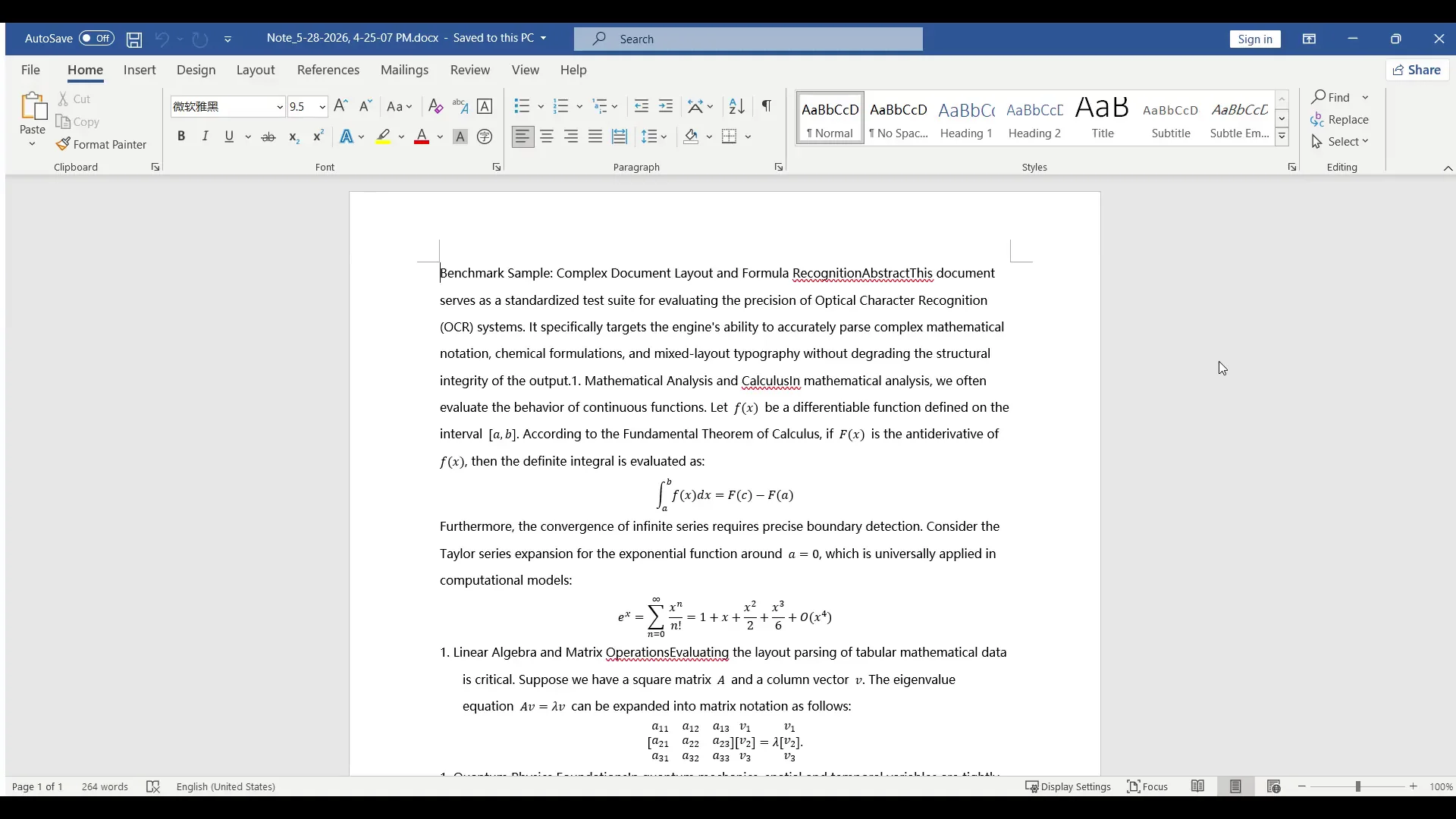
Math OCR to Word
A normal OCR tool can extract plain text, but math documents need more than characters. Offline OCR is built for formulas, symbols, superscripts, subscripts, matrices, fractions, and mixed text around equations.
Upload a worksheet photo, screenshot, scanned page, or formula image. The workflow is designed for math-heavy pages where retyping would be slow and error-prone.
Check recognized equations before export. Correcting formulas inside the review workflow gives you a cleaner Word document than copying raw OCR text.
Create a Word-ready file with editable equation output where supported, plus text, layout, PDF, LaTeX, or project export.
Why it matters
Math pages combine text, notation, symbols, and layout. Fractions, matrices, integrals, and multi-line equations often lose meaning when they are treated like normal text. A math-aware OCR workflow helps you preserve structure, correct recognition mistakes, and reuse the result in Word.
Keep formulas reusable for homework, lesson material, reports, and study notes.
Review recognized text and formula regions before creating the final document.
Use Word for editing, PDF for sharing, LaTeX for markup, and text for quick extraction.
Word editability
The goal of math OCR is not just to copy pixels from an image into a document. Offline OCR helps you turn recognized text and supported formulas into Word-ready output so you can edit, format, reuse, and correct the result.
Recognize explanations, problem statements, labels, and paragraphs around equations.
Review fractions, superscripts, subscripts, roots, brackets, matrices, Greek letters, and operators before export.
Use Word to correct OCR mistakes, adjust formatting, rewrite problem text, or prepare study and teaching material.
Workflow
Upload a clear worksheet photo or scanned math page.
Run math OCR to detect text blocks, formulas, symbols, and page structure.
Pay attention to small exponents, similar-looking symbols, nested fractions, and matrices.
Export the result as a Word document, then finish cleanup in Microsoft Word or your preferred editor.
Best for
Turn handwritten or printed math notes into editable study material.
Reuse scanned worksheets without rebuilding every equation from scratch.
Extract formulas and dense text from academic or engineering material.
Accuracy tips
Math OCR gives you a faster starting point, but it is not a replacement for review. Always check complex formulas before using the exported document in homework, teaching material, exams, or research notes.
OCR paths
FAQ
Yes. Supported formulas can be exported into Word-ready equation output. Complex notation may still need manual correction after recognition.
Yes. Normal OCR mainly extracts plain text. Math OCR focuses on formulas, symbols, layout review, and export formats that are useful for math-heavy documents.
You can scan handwritten math notes and export a Word starting point, but recognition quality depends on handwriting clarity, lighting, image sharpness, and formula complexity.
Yes. The formula-focused workflow supports LaTeX and text extraction in addition to Word and PDF export.
Related OCR workflows
PDF to Word with equations
Convert scanned math PDFs into Word documents with editable equations. Review page blocks, correct formulas, and export reusable Word, PDF, LaTeX, or text.
image to Word equation
Convert equation screenshots and formula photos into Word-ready output. Review symbols, fix OCR mistakes, and export editable equations instead of flat images.
offline math OCR
Scan math formulas, notes, worksheets, and documents with local OCR on your device. Keep everyday recognition private, with optional Cloud AI for complex formulas.
editable Word equations
Turn scanned formulas and equation screenshots into editable Word equation output where supported. Compare native equations, image fallback, LaTeX, and PDF export.
Offline OCR: Math to Word