Open a scanned page
Start from a worksheet image, formula screenshot, math note, or document scan.
free online OCR editor
Try a browser-based OCR editor for math notes, worksheets, and formula images. Upload a scan, review recognized blocks, correct the result, and see how your document can be exported.
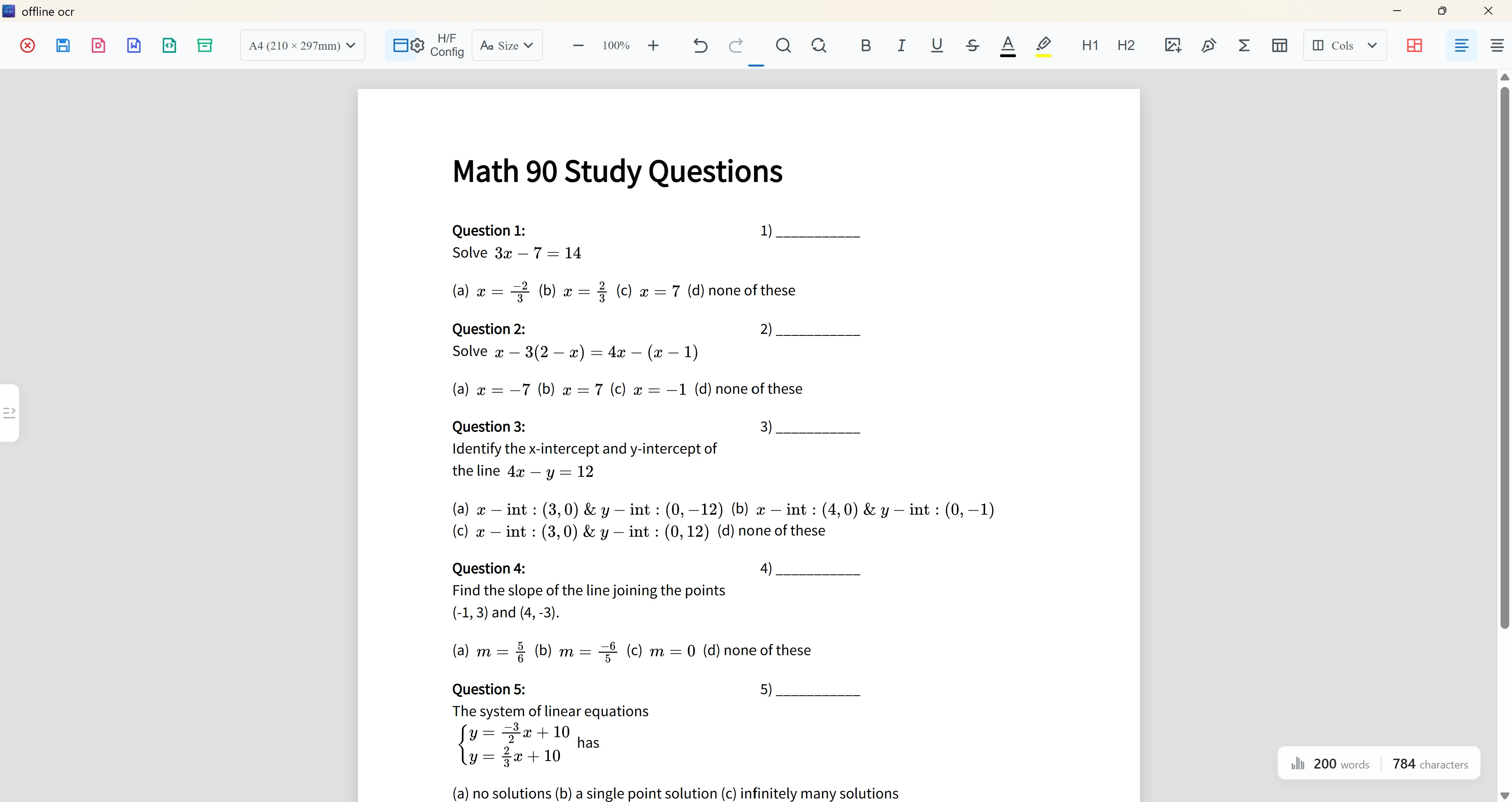
Online OCR editor
A useful OCR result is not just a wall of copied text. The editor helps you inspect the page, review recognized text and formula regions, and choose an export format that fits your workflow.
Start from a worksheet image, formula screenshot, math note, or document scan.
Check recognized text, formulas, and layout areas before creating the final file.
Create PDF, Word, LaTeX, text, or a project file depending on how you want to reuse the result.
Why it matters
Use the online editor to test the full OCR workflow: upload a math scan, review recognized text and formula blocks, then export a cleaner Word or PDF result. For private offline work and native export workflows, use the Android or Windows app.
Try OCR from the web before setting up a full desktop or mobile workflow.
Review the document visually instead of losing structure in a plain text box.
Save an OCR project when you want to continue reviewing or exporting from another device.
Workflow
Choose a formula image, worksheet scan, or math-heavy page.
Recognize text blocks, formula areas, symbols, and page structure.
Correct text, inspect formulas, and clean up layout before export.
Download the result, save a project file, or move to the app for offline and advanced workflows.
Best for
Check how a formula image or worksheet scan performs before committing to a longer workflow.
See page blocks and formulas in context instead of copying raw OCR text.
Create a cleaner starting point for Word, PDF, LaTeX, or text export.
Privacy note
The web editor is convenient for quick tests. For sensitive notes, private classroom material, or documents you do not want to upload, use local OCR in the Android or Windows app.
OCR paths
FAQ
Yes. You can use the online editor to test the OCR workflow and see how math document review works.
Supported formulas can be prepared for editable Word output. Always review complex formulas before final export.
The editor is page-based, so it is better for layout review than a plain image-to-text box. Dense pages may still need cleanup.
Use the app for private local OCR, offline workflows, native export, and longer document editing.
Related OCR workflows
math OCR to Word
Convert scanned math notes, worksheets, and formula images into editable Word documents. Review OCR blocks, correct equations, and export Word, PDF, LaTeX, or text.
PDF to Word with equations
Convert scanned math PDFs into Word documents with editable equations. Review page blocks, correct formulas, and export reusable Word, PDF, LaTeX, or text.
offline math OCR
Scan math formulas, notes, worksheets, and documents with local OCR on your device. Keep everyday recognition private, with optional Cloud AI for complex formulas.
editable Word equations
Turn scanned formulas and equation screenshots into editable Word equation output where supported. Compare native equations, image fallback, LaTeX, and PDF export.
Offline OCR: Math to Word