Recognize worksheet structure
Review problem text, formula areas, blanks, answer sections, and page blocks before export.
OCR math worksheet
Convert math worksheets into editable Word and PDF documents. Recognize formulas, problem text, answer areas, and worksheet layouts for reuse.
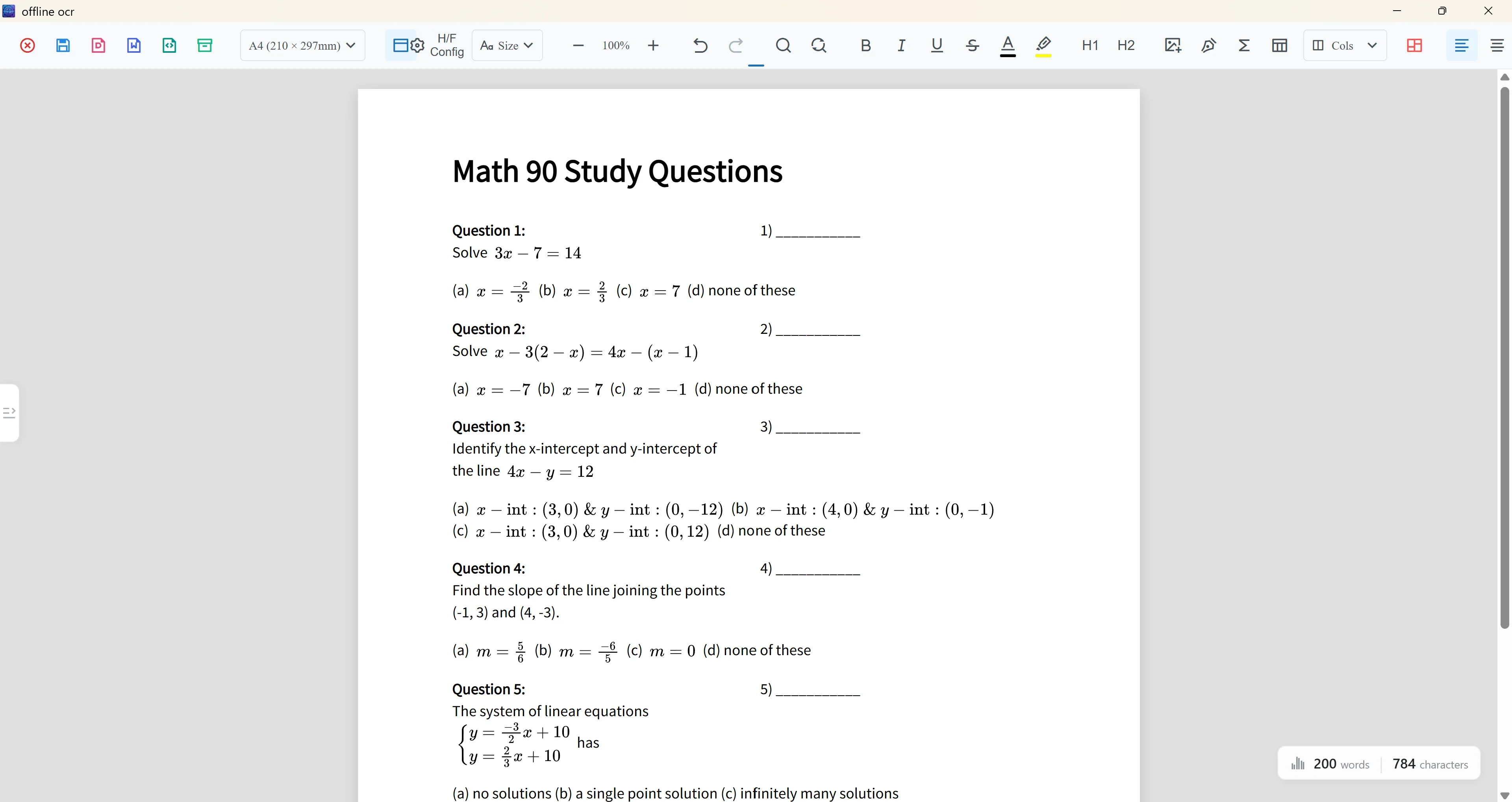
Worksheet OCR
Math worksheets often combine formulas, instructions, blanks, answer areas, and dense page layout. Offline OCR helps teachers and students review worksheet scans and export reusable Word or PDF documents.
Review problem text, formula areas, blanks, answer sections, and page blocks before export.
Turn old scans and printed pages into documents you can update for new classes.
Use Word when you need editing and PDF when you need a clean layout for sharing or printing.
Built for classroom documents
A plain image-to-text tool can lose the visual structure of a worksheet. A page-based OCR editor helps you inspect formulas, exercise numbers, answer spaces, and columns before creating the final file.
Reuse archived teaching material without rebuilding every equation manually.
Review dense answer keys and formula-heavy solutions before export.
Prepare cleaned-up Word or PDF files for sharing, printing, and archiving.
Workflow
Start from a scanned page, phone photo, PDF page, or screenshot.
Recognize problem text, formulas, answer areas, and page layout.
Check formula regions, columns, blanks, and dense areas before export.
Create an editable document or a clean layout file for sharing.
Teacher tips
OCR paths
FAQ
Yes. Scan or upload a worksheet, review the OCR output, and export it as a reusable document.
Yes, but dense answer keys and tight columns may require manual review before export.
Yes. The workflow supports PDF export as well as Word output for editable content.
Supported formulas can be exported as editable Word equation output, but complex formulas may need correction.
Related OCR workflows
PDF to Word with equations
Convert scanned math PDFs into Word documents with editable equations. Review page blocks, correct formulas, and export reusable Word, PDF, LaTeX, or text.
scanned math notes to Word
Convert scanned math notes into editable Word documents. Recognize handwritten or printed formulas, review OCR output, and export reusable study material.
offline math OCR
Scan math formulas, notes, worksheets, and documents with local OCR on your device. Keep everyday recognition private, with optional Cloud AI for complex formulas.
math OCR to Word
Convert scanned math notes, worksheets, and formula images into editable Word documents. Review OCR blocks, correct equations, and export Word, PDF, LaTeX, or text.
Offline OCR: Math to Word